






Liberty 5 Pro Max | Słuchawki douszne z notatnikiem z AI i inteligentnym etui
chip Anker Thus™ AI + Ekran AMOLED: Nowe możliwości słuchawek dousznych.
Kolor:
- W kwietniu 2026 r. model soundcore Liberty 5 Pro został wpisany do Księgi Rekordów Guinnessa (Guinness World Records) w kategorii „Najlepszy wynik jakości mowy (G-MOS) wśród słuchawek dousznych TWS (test obiektywny)”. Model Liberty 5 Pro Max ma te same moduły i zapewnia taką samą jakość połączeń.
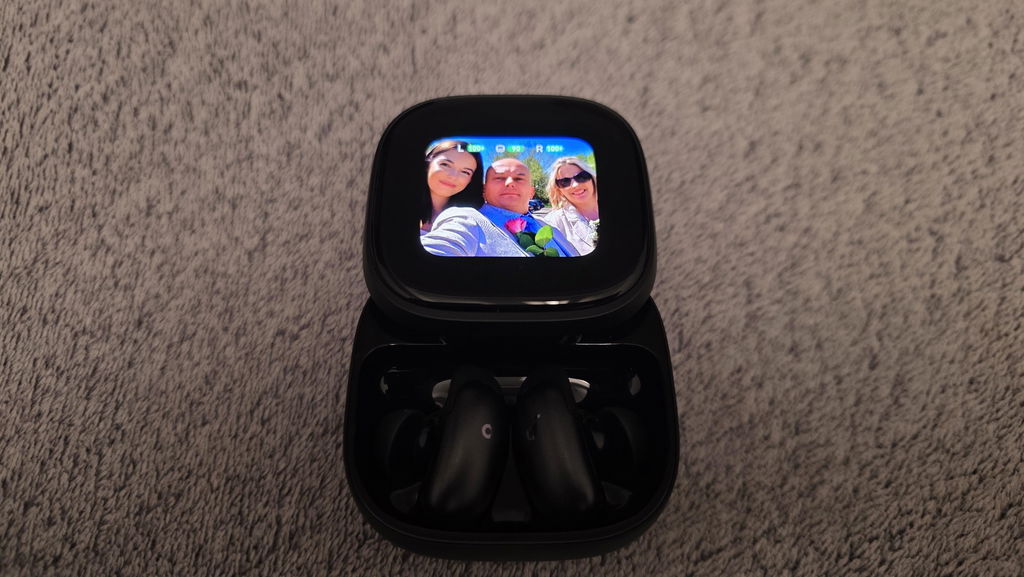
- NOTATNIK Z AI: Inteligentne etui ładujące rejestruje spotkania, wykłady i wywiady za pomocą wbudowanego mikrofonu, a następnie transkrybuje je i generuje podsumowania, zawierające ważne kwestie i zadania do wykonania. Nagrywa wyłącznie dźwięk z otoczenia w pomieszczeniu – nie rejestruje dźwięku z spotkań online, rozmów wideo ani rozmów telefonicznych. Pracą można zarządzać w podróży za pomocą aplikacji soundcore (iOS/Android) lub korzystać z portalu internetowego z asystentką AI „Anką”, która zapewnia wydajne zarządzanie z poziomu komputera.
-
150-krotny wzrost mocy obliczeniowej: pierwsze na świecie bezprzewodowe słuchawki douszne Bluetooth wyposażone w chip z AI z przetwarzaniem danych w pamięci. Chip ANKER Thus™ AI to połączenie procesora i pamięci, które eliminuje ograniczenia przepustowości danych i zapewnia 150-krotny wzrost mocy obliczeniowej.
- Sterowanie dotykowe: duży wyświetlacz AMOLED o przekątnej 1,78 cala umożliwia dostęp do dyktafonu oraz zarządzanie ustawieniami z poziomu ekranu. Dodaj własne tapety, aby nadać etui ładującemu prawdziwie osobisty charakter.
-
Natychmiastowe wyciszenie: Algorytm redukcji szumów ANC 4.0 oparty na AI. Dzięki 8 czujnikom i chipowi AI Thus™ słuchawki przetwarzają ponad 384 tys. sygnałów szumu na sekundę, blokując hałas metra, biura lub ulicy.
-
Idealnie wyraźne połączenia: Dzięki 10 czujnikom i chipowi Thus™ AI możesz rozmawiać bez zakłóceń zarówno w hałaśliwym otoczeniu (ponad 100 dB), jak i w cichym pokoju lub podczas prywatnej rozmowy. Twój głos jest zawsze dobrze słyszalny — niezależnie od tego, czy szepczesz, mówisz normalnie, czy krzyczysz.
- Personalizacja brzmienia: HearID 5.0 ze spersonalizowanym korektorem i wzmacniaczem dźwięku opartym na sztucznej inteligencji zapewnia dźwięk precyzyjnie dostrojony do Twoich uszu.
Usługi i korzyści

Szybka wysyłka
Metoda płatności


ANKER Thus™


Notatnik z AI


Sterowanie dotykowe


Najwyraźniejsze rozmowy na świecie


ANC 4.0


Wyraźne rozmowy nawet szeptem


Spersonalizowana regulacja korektorów brzmienia
Nasza technologia analizuje Twój słuch i preferencje, a następnie tworzy spersonalizowany profil korektora – precyzyjnie dostosowany do Ciebie.
Tak wygodne, że zapomnisz, że masz je na sobie
Dzięki zmniejszeniu rozmiaru słuchawek o 38% oraz dostępności wielu rozmiarów wkładek dousznych możesz dopasować je do siebie, co minimalizuje ucisk i zapewnia prawdziwy komfort przez cały dzień.
Sterowanie głosowe bez opóźnień
3× szybsze reakcje niż w innych systemach sterowania głosowego — polecenia są wykonywane natychmiast.Uwaga: W porównaniu ze standardowym systemem sterowania głosowego, w odniesieniu do czasu reakcji na polecenia głosowe, takie jak „Następny utwór”. Na podstawie testów przeprowadzonych w laboratorium soundcore.
Etui ładujące z zaawansowanymi funkcjami
Etui ładujące Liberty 5 Pro Max ma wbudowany wyświetlacz AMOLED o przekątnej 1,78 cala oraz funkcję notatnika AI. To coś więcej niż tylko etui do ładowania słuchawek — to Twój inteligentny asystent.
Informacje o produkcie


Specyfikacje
| Notatnik AI | Nagrywanie + transkrypcja + podsumowanie przez AI |
| Przetworniki | Głośniki z membraną z papieru wełnianego o grubości 9,2 mm |
| Czas odtwarzania | ANC włączone: Tryb ekstremalny: 2,5 godz. / 10,5 godz. (z etui) Tryb standardowy: 6,5 godz. / 28 godz. (z etui) |
| Dźwięk | Dźwięk hi-fi dzięki membranom z papieru wełnianego |
| Wodoodporność | IP55 |
| Wersja Bluetooth | 6.1 |
| Adaptacyjna redukcja szumów | Adaptive ANC 4.0 |
| Szybkie ładowanie | 5 minut ładowania = 4 godziny odtwarzania |
| Połączenia telefoniczne | 8 mikrofonów + 2 procesory VPU + duży model Al |
| Połączenie z wieloma urządzeniami | Tak |
| Personalizowane korektory dźwięku | HearlD 5.0 + ulepszenie dźwięku przez Al |
| Waga | 5,5 g (bez etui) |
| Funkcje specjalne | Chip ANKER Thus™ z AI |
| Konstrukcja | Douszna |
FAQ
2. Try playing different types of music and ensure the input audio source is not distorted or noisy.
3. Customize your sound using HearID in the app. It provides you with a precise hearing preference test that deeply analyzes your unique taste and creates a personalized EQ curve.
4. Go to: App > soundcore Sound > Preference Test (HearID).
You can also try different EQ presets in the soundcore app and customize the EQ to your preference.
2. Place the earbuds in the case, close the lid, reopen, and restart them.
3. Check the audio balance on your Bluetooth device:
On Android: Settings > Accessibility > Audio & On-screen Text > Audio > Balance.
On iOS: Settings > Accessibility > Audio/Visual > Audio Balance.
On Samsung: Settings > Accessibility > Hearing enhancements > Left/right sound balance.
Note: If you shift the slider to the left, the left earbud becomes louder and the right becomes quieter. If you shift to the right, the right earbud becomes louder and the left becomes quieter.
1. Try different sizes of ear wings/ear tips to ensure a snug fit and tight seal. If one size doesn't fit well, try different sizes for each ear (e.g., M tip on the left, L tip on the right).
2. Make sure the earbuds are worn correctly for a tight seal to ensure optimal ANC functionality. To check for the optimal fit, run the Fit Test in the soundcore app (App > Earbud Home > More Settings > Fit Test). A poor fit will affect ANC performance.
3. Test the earbuds in different environments to see if the issue is environment-related.
4. If you're still not satisfied with Level 5 ANC, try Airplane Mode in the app by going to: App Home > Ambient Sound > Noise Cancellation mode > Commute Multi-Mode (includes Airplane/Car) > Airplane Mode.
Note:
1. ANC cannot completely eliminate ambient noise, especially in noisy environments. There may still be some residual noise.
2. It takes a few seconds for ambient sound modes to adjust and stabilize when switching modes; this is normal.
Customer Reviews
Casca dreapta scoate un pocnit cand masina trece peste denivelari, sau cand autobuzul vibreaza.
Są Super! AirPods 3 Pro pojechały do szuflady, a od ponad roku uźywałem ich po 5-6 godzin tygodniowo. Robotę robi w nich equalizer oraz dodatkowe motylki, które pewni trzymają słuchawki w uchu! Zaznaczam, źe to bardzo subiektywna ocena!
Bit expensive,but worth it. Been using now for a week and really happy. Comfort exceptional. Anc brilliant .Controls Including voice fantastic. Other upgrades are game changing. Only recommendation is don't go with soundcore signature settings. Take the time to do fit test and hear id to get your custom tuning and makes a huge difference.
Best ❤️
Te słuchawki to jest totalny szok i absolutny kosmos! Soundcore Liberty 5 Pro Max to taki kombajn multimedialny, że do teraz nie mogę wyjść z niedowierzania. Moje dotychczasowe Samsungi Buds2 Pro i Buds3 Pro przy nich wyglądają tak, jakbym przesiadł się z wysłużonego Malucha nie tyle do Ferrari, co do rakiety kosmicznej! Ilość funkcji, jakość dźwięku i ta zaawansowana sztuczna inteligencja, która w nich siedzi, po prostu zdejmują skalp. To trzeba usłyszeć na własne uszy, bo mózg staje w poprzek!