






Liberty 5 Pro Max | AI Recording Earbuds with Smart Case
Anker Thus™ AI Chip+ AMOLED Screen: Redefine What Earbuds Can Do.
Color:
- Guinness World Records: soundcore Liberty 5 Pro was certified by Guinness World Records in April 2026 as the "Highest speech quality score (G-MOS) for TWS earbuds (objective test)." Liberty 5 Pro Max features the same earbud units, delivering identical call performance.
- AI Note-Taker: The smart charging case records the meetings, lectures, and interviews happening around you through its built-in microphone, then transcribes them and generates AI summaries with key points and action items—so you walk away with a clear record, not a blank page. Records in-person, in-room audio only; it does not capture audio from online meetings, video calls, or phone calls. Manage workflows on the go via the soundcore app (iOS/Android), or use the Web portal with the "Ask Anka" AI assistant for efficient desktop management.
-
150x Power: The world’s first wireless Bluetooth earbuds powered by AI chip with neural Compute-in-Memory technology. ANKER Thus™ AI Chip integrates the processor and memory into a single unit, eliminating data bottlenecks and delivering 150x greater computing performance.
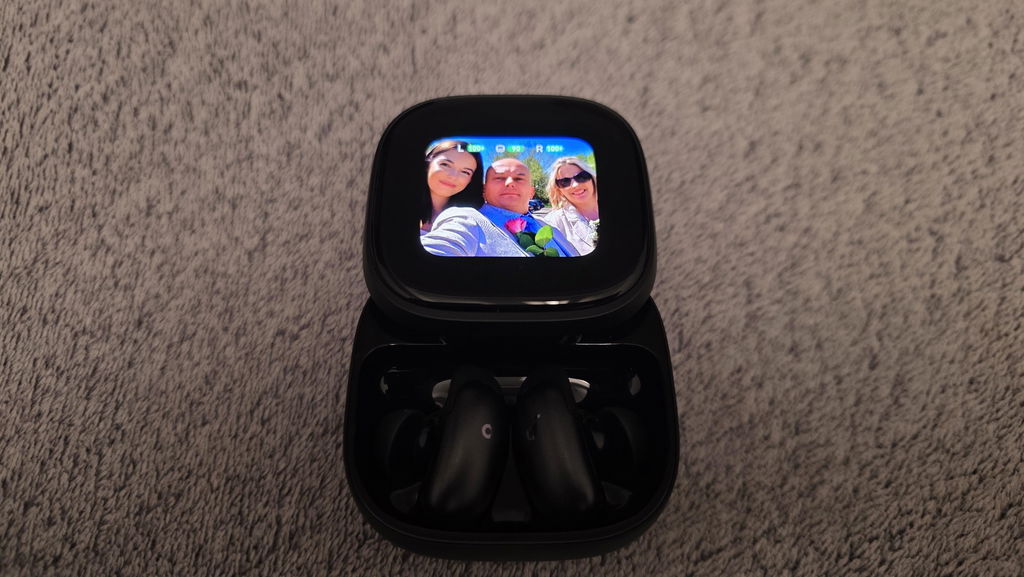
- Effortless Screen Control: Features a large 1.78" AMOLED display that lets you access the AI Voice Recorder, adjust ANC, and manage earbud settings—all from the screen. Add custom wallpapers to make your charging case truly yours.
- Whisper-Clear Calls: Equipped with 10 sensors and the Thus™ AI Chip, enjoy crystal-clear calls in 100 dB+ noisy environments or even quiet rooms. Whisper, speak, or shout—your voice is always heard, anywhere you go.
- Instant Pure Silence: ANC 4.0 AI Noise Cancellation Algorithm. Powered by 8 sensors and the Thus™ AI Chip, the earbuds process 384K+ noise signals per second, blocking subway, office, or street chaos for instant silence.
-
Crystal-Clear Calls: Equipped with 10 sensors and the Thus™ AI Chip, enjoy crystal-clear calls in 100 dB+ noisy environments, a quiet room, or taking a private call. Whisper, speak, or shout—your voice is always heard, anywhere you go.
-
Your Signature Sound: HearID 5.0 with personalized EQ and an AI Audio Enhancer deliver sound precisely tuned to your ears. No more compromises with generic, standard audio.
Services and Benefits

Fast Shipping
Payment Method


ANKER Thus™


AI Note-Taker


Effortless Screen Control


World's Clearest Earbuds for Calls


ANC 4.0


Whisper-Clear Call


Personalized EQ Adjustment
Tests your hearing, analyzes your taste, and generates a custom EQ profile—tuned precisely to you.
Wear It, Forget It
With a 38% smaller body and multiple ear tip sizes to choose from, it delivers a comfortable, personalised fit that minimises ear pressure, ensuring true all-day comfort.
Lag-Free Voice Control
3× faster responses than other voice control systems—commands execute instantly.Note: Compared to a standard voice control system, specific to the response time for voice commands like "Next track." Based on testing in the soundcore lab.
Charging Case Built for Smart Features
The Liberty 5 Pro Max charging case features a built-in 1.78'' AMOLED smart display and AI Note-Taker. It's more than a case to charge your earbuds—it's your smart assistant.
Product Information


Specs
| Al Note-Taker | Al Recording + Transcription + Summary |
| Drivers | 9.2mm Wool-Paper Diaphragm Drivers |
| Playtime | ANC On: Extreme: 2.5 Hrs / 10.5 Hrs (With Case) Standard: 6.5 Hrs / 28 Hrs (With Case) |
| Sound | Hi-Fi Sound with Wool-Paper Diaphragms |
| Water Resistance | IP55 |
| Bluetooth Version | 6.1 |
| Active Noise Cancellation | Adaptive ANC 4.0 |
| Fast Charging | 5 Mins Charge = 4 Hrs Playtime |
| Calls | 8 Mics + 2 VPUs + Al Large Model |
| Multipoint Connection | Yes |
| Customized EQ | HearlD 5.0 + Al Sound Enhancement |
| Weight | 5.5g (Without Case) |
| Special Features | Anker Thus™ AI Chip |
| Design | In-Ear |
| Control | 20 Built-In Commands |
FAQ
2. Try playing different types of music and ensure the input audio source is not distorted or noisy.
3. Customize your sound using HearID in the app. It provides you with a precise hearing preference test that deeply analyzes your unique taste and creates a personalized EQ curve.
4. Go to: App > soundcore Sound > Preference Test (HearID).
You can also try different EQ presets in the soundcore app and customize the EQ to your preference.
2. Place the earbuds in the case, close the lid, reopen, and restart them.
3. Check the audio balance on your Bluetooth device:
On Android: Settings > Accessibility > Audio & On-screen Text > Audio > Balance.
On iOS: Settings > Accessibility > Audio/Visual > Audio Balance.
On Samsung: Settings > Accessibility > Hearing enhancements > Left/right sound balance.
Note: If you shift the slider to the left, the left earbud becomes louder and the right becomes quieter. If you shift to the right, the right earbud becomes louder and the left becomes quieter.
1. Try different sizes of ear wings/ear tips to ensure a snug fit and tight seal. If one size doesn't fit well, try different sizes for each ear (e.g., M tip on the left, L tip on the right).
2. Make sure the earbuds are worn correctly for a tight seal to ensure optimal ANC functionality. To check for the optimal fit, run the Fit Test in the soundcore app (App > Earbud Home > More Settings > Fit Test). A poor fit will affect ANC performance.
3. Test the earbuds in different environments to see if the issue is environment-related.
4. If you're still not satisfied with Level 5 ANC, try Airplane Mode in the app by going to: App Home > Ambient Sound > Noise Cancellation mode > Commute Multi-Mode (includes Airplane/Car) > Airplane Mode.
Note:
1. ANC cannot completely eliminate ambient noise, especially in noisy environments. There may still be some residual noise.
2. It takes a few seconds for ambient sound modes to adjust and stabilize when switching modes; this is normal.
Customer Reviews
Casca dreapta scoate un pocnit cand masina trece peste denivelari, sau cand autobuzul vibreaza.
Są Super! AirPods 3 Pro pojechały do szuflady, a od ponad roku uźywałem ich po 5-6 godzin tygodniowo. Robotę robi w nich equalizer oraz dodatkowe motylki, które pewni trzymają słuchawki w uchu! Zaznaczam, źe to bardzo subiektywna ocena!
Bit expensive,but worth it. Been using now for a week and really happy. Comfort exceptional. Anc brilliant .Controls Including voice fantastic. Other upgrades are game changing. Only recommendation is don't go with soundcore signature settings. Take the time to do fit test and hear id to get your custom tuning and makes a huge difference.
Best ❤️
Te słuchawki to jest totalny szok i absolutny kosmos! Soundcore Liberty 5 Pro Max to taki kombajn multimedialny, że do teraz nie mogę wyjść z niedowierzania. Moje dotychczasowe Samsungi Buds2 Pro i Buds3 Pro przy nich wyglądają tak, jakbym przesiadł się z wysłużonego Malucha nie tyle do Ferrari, co do rakiety kosmicznej! Ilość funkcji, jakość dźwięku i ta zaawansowana sztuczna inteligencja, która w nich siedzi, po prostu zdejmują skalp. To trzeba usłyszeć na własne uszy, bo mózg staje w poprzek!